
Ekahau WiFi Survey in China Offices: Avoid Mistakes
Using Ekahau To Spot Common Mistakes
Over the past few years we’ve carried out many Wi‑Fi surveys across China, but one Ekahau WiFi survey in a busy Shanghai office still stands out. The client, a global company with a local team in People’s Square, kept reporting:
Poor performance and slow file access
Random drops from the corporate WLAN
Video calls that froze at the worst possible moment
On paper the design looked fine and every desk technically had coverage. Yet people were still unhappy — a clear sign that coverage alone is not enough.
During that Ekahau WiFi survey in their China office we quickly saw why. The network relied on rather old Cisco AP1602 access points. For reasons no one could clearly explain, 5 GHz was disabled, so every device fought for space on the already crowded 2.4 GHz band. In a city like Shanghai, where every neighbor has at least one wireless router and countless IoT gadgets, that is asking for trouble.
Using Ekahau and our standard Ekahau Site Survey workflow, we walked the floor and recorded what the air actually looked like. That Ekahau Site Survey showed that 97.8% of the surface was covered by seven radios or more — as crowded as People’s Square Metro station at rush hour. This is something we see again and again when we run an Ekahau WiFi survey in dense Chinese business districts.
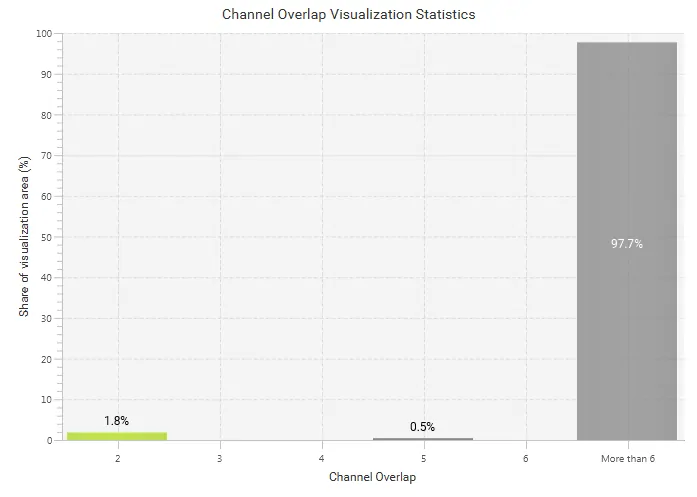
That’s a crowded radiospace.
Many of these radios were transmitting on channels 1, 6, or 11. On 2.4 GHz Wi‑Fi you have up to 13 channels available, so at first glance it is tempting to move away from the busy ones. That is exactly what the on‑site administrator tried to do — and where the problems really started.
As many Wi‑Fi engineers like to say, “You can’t fix what you can’t see.”
A survey shows you what the RF environment really looks like, not what you hope it looks like.
When Things Get Crowded

The local network admin correctly recognized that too many radios on the same channel cause Co‑Channel Interference (CCI) and can slow everything down. His conclusion sounded logical:
“If channels 1, 6, and 11 are packed, let’s switch our access points to quieter channels 2 and 3.”
On the controller screen this even looked better — fewer neighboring APs showed up on the same channel number. It is the kind of decision many teams make before they ever run an Ekahau WiFi survey in the building — and one that Wi-Fi design best practices consistently warn against.
But Wi‑Fi does not work like separate lanes on a highway. The 2.4 GHz channels overlap with each other. By picking “in‑between” channels, the admin reduced CCI but created something far worse: Adjacent Channel Interference (ACI). Instead of many people politely queuing on the same channel, we now had several groups shouting over each other on slightly different but overlapping channels.
Users experienced this as:
Slower throughput than expected, even when signal strength looked strong
Random disconnects during calls and file transfers
Devices that stubbornly stayed on 2.4 GHz even when 5 GHz networks from neighbors were available
Only a detailed Ekahau WiFi survey in that Shanghai office made the picture obvious. The heatmaps clearly showed strong signals from overlapping channels 1, 2, 3, 4, and 5 stacking on top of each other, creating noise and reducing the signal‑to‑noise ratio (SNR) for every client.
The key lesson: good signal strength is not enough. Channel planning and interference matter just as much as how many bars a device shows.
Overlapping
To understand why this happens, it helps to look at how 2.4 GHz channels are arranged. Each channel is about 20 MHz wide, but they start only 5 MHz apart. In practice that means:
Channel 1 overlaps with channels 2, 3, 4, and 5
Channel 6 overlaps with channels 2–5 and 7–10
Channel 11 overlaps with channels 7–10
Only channels 1, 6, and 11 are far enough apart to behave as non‑overlapping channels.
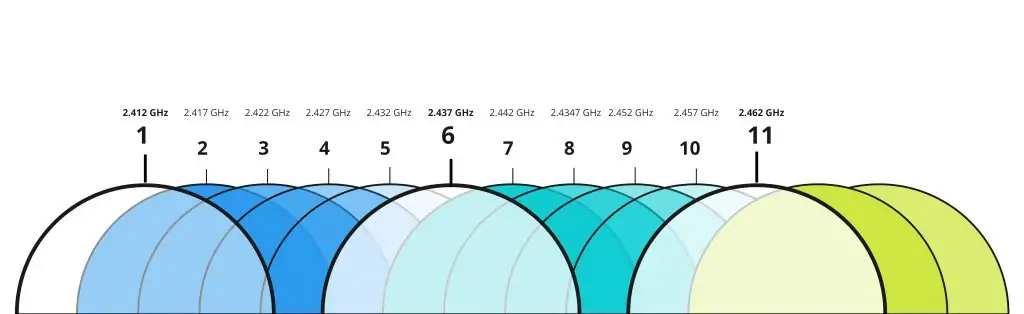
Wi‑Fi channels aren’t neatly separated. In fact, they overlap.
A simple way to visualize this is:
| Channel | Overlaps With | Recommended Use? |
|---|---|---|
| 1 | 2, 3, 4, 5 | Yes, as part of 1/6/11 |
| 6 | 2–5, 7–10 | Yes, as part of 1/6/11 |
| 11 | 7–10 (and 12–13 where used) | Yes, as part of 1/6/11 |
| 2–5, 7–10 | Neighbors above and below | Avoid in most designs |
That is why channels 1, 6, and 11 are so commonly used: they give you the maximum number of channels that do not overlap with each other. In a small office with just a few APs this is usually enough. In a tall office tower in Shanghai or Shenzhen, overlapping is almost guaranteed — but there is a big difference between good and bad overlapping.
With CCI, multiple APs share the same channel. They hear each other, take turns, and back off when the channel is busy. It can feel crowded, but at least everyone follows the same rules.
With ACI, APs transmit on partially overlapping channels. An AP on channel 1 cannot properly “hear” one on channel 2, so both may transmit at the same time. Clients receive two mixed signals, which look like noise and need to be retransmitted. The result: lower throughput and a poor user experience, even though your AP count and signal levels might look fine on paper.
An Ekahau WiFi survey in this kind of environment lets you see CCI and ACI separately. Instead of guessing based on a single AP’s view, you get a building‑wide picture of:
Which channels clash
Where those clashes occur
At what signal levels they affect clients
That makes it much easier to decide whether you can keep 2.4 GHz at all in parts of the office, or whether you should steer most clients to 5 GHz and 6 GHz.
Why An Ekahau WiFi Survey In A China Office Matters

For international companies, a China office often sits in a dense urban high‑rise, surrounded by dozens of other businesses, apartments, and retail units. Every one of them runs its own Wi‑Fi. Without a proper Ekahau WiFi survey in place, your corporate network ends up competing for the same air, and small configuration mistakes grow into daily user complaints.
During an Ekahau WiFi survey in projects across Shanghai, Beijing, Guangzhou, and major manufacturing hubs — patterns also documented in research on open source systems for monitoring wireless outdoor networks in challenging environments — we usually find the same recurring issues:
Legacy 2.4 GHz‑only deployments that were never upgraded
Auto‑channel settings that create ACI instead of reducing interference
Access points hidden above ceilings, inside cabinets, or behind metal structures
Consumer‑grade routers installed by tenants or contractors that fight with the corporate WLAN
On top of that, global IT teams based in the US or Europe rarely have a clear picture of what the RF environment inside their China office really looks like. An Ekahau WiFi survey in that location gives them hard data:
Signal strength and coverage holes
Signal‑to‑noise ratio and interference sources
Channel reuse patterns across floors
Real roaming behavior between APs
That evidence makes it far easier to justify upgrades to management and to align local integrators with corporate standards.
Security and compliance matter as well. During an Ekahau WiFi survey in a China office we can flag:
Rogue or unauthorized access points
Open or poorly secured guest networks
Legacy encryption such as WEP or WPA
Misconfigured SSIDs that bypass corporate policies
For finance and compliance officers, that is as important as throughput — especially when sensitive data or regulated workloads are involved.
A reliable Wi‑Fi survey is not just a performance check; it is a risk assessment for your wireless infrastructure.
How We Run An Ekahau WiFi Survey In Your China Office
At NETK5, an Ekahau WiFi survey in your China office is not just someone walking around with a laptop. We follow a structured process that links RF measurements to your business requirements, user experience, and global IT standards.
Step 1: Understand Your Requirements
We start with a call between your regional or global IT team and the local office. Together we clarify how the network is used, for example:
Business‑critical applications (ERP, CRM, database access)
Voice and video needs (Teams, Zoom, Webex, softphones)
Guest access and visitor usage patterns
Warehouse scanners, handhelds, and production lines
IoT devices, printers, and specialty equipment
We collect accurate floor plans and import them into Ekahau AI Pro, set coverage and capacity targets, and agree on any constraints, such as:
Areas where new cabling is difficult or prohibited
Spaces with strict construction rules or limited access
Neighboring tenants who already run strong Wi‑Fi networks
This first step keeps the Ekahau WiFi survey focused on what matters most to your users rather than chasing perfect heatmaps that do not match real needs.
Step 2: Predictive Design And Checks
Before visiting the site, we often create a predictive design inside Ekahau AI Pro. The software models your walls, materials, and AP types, and suggests where access points should sit and which channels they should use.
Features such as the AI‑driven Auto‑Planner and Channel Planner help us quickly test different layouts and power levels, so we arrive on‑site with a strong starting point instead of guessing. During this stage we typically:
Compare different AP models and antenna patterns
Test coverage for dense areas like meeting rooms or open offices
Check how signals pass through glass, concrete, and metal structures
Plan for both current needs and expected growth in device count
By the time we step into your China office, we already have a data‑driven draft design ready to validate with a real Ekahau WiFi survey.
Step 3: On‑Site Ekahau WiFi Survey In The Office
On site, we connect an Ekahau Sidekick 2 to a tablet or laptop and walk every area of your office or factory. The Ekahau Survey app records real‑world data:
Signal strength and coverage
Interference and noise levels
SNR and retry rates
Roaming behavior between APs
Presence of neighboring and rogue networks
Depending on the environment, we may use continuous, stop‑and‑go, or GPS‑based survey modes to cover both indoor and outdoor spaces. We pay special attention to:
Meeting rooms and collaboration spaces
Lift lobbies, corridors, and stairwells
Warehouses, production lines, and loading bays
Areas with lots of metal racks or machinery
The result is a detailed Ekahau WiFi survey in your exact China office, not a generic lab test or controller screenshot.
Step 4: Analysis, Reporting, And Recommendations
Back in the office, we bring the data into Ekahau AI Pro. Heatmaps show where CCI and ACI occur, which APs create most of the noise, and where clients struggle with low SNR. Ekahau Optimizer then turns that information into clear, step‑by‑step suggestions such as:
Channel changes and power adjustments
Relocation or removal of specific APs
A move away from 2.4 GHz to 5 GHz and 6 GHz in selected areas
Additional APs in high‑density zones where capacity is not sufficient
We summarize this in a language that managers understand — business impact, risk, and cost — while still giving your technical team all the detail they need. Typical deliverables include:
An executive summary for non‑technical stakeholders
Detailed heatmaps and channel plans for engineers
A prioritized action list so you know what to fix first
Because we use Ekahau Cloud, your US‑based engineers can review the same project file that we created during the Ekahau WiFi survey in your China office, comment on it, and align the final design with global standards.
Predictive Planning With Ekahau

In the Shanghai case, the admin had correctly spotted that interference was the problem, but his channel changes pushed the network from heavy CCI into severe ACI. After running the Ekahau WiFi survey in full and reviewing the results with him, we redesigned the WLAN based on a predictive model instead of guesswork.
Using Ekahau AI Pro, we created a new layout that:
Reduced the number of 2.4 GHz radios and standardized them on channels 1, 6, and 11
Shifted most capacity to 5 GHz, with a plan to add Wi‑Fi 6E and 6 GHz coverage in critical areas
Adjusted transmit power so cells overlapped enough for roaming without blasting through walls and floors
Reserved clean channels for voice and real‑time applications
For a new office, this predictive step can happen before a single cable is pulled. For an existing site, it turns an Ekahau WiFi survey in a China office into a practical roadmap: you can see exactly which APs to move, replace, or reconfigure first to get the biggest gain for the least effort.
If you are planning a new site or suspect that your current Wi‑Fi design in China is holding back your users, talk to us about an Ekahau Site Survey. We can combine a predictive model with an on‑site Ekahau WiFi survey in your China office to give you clear, data‑driven recommendations instead of trial and error.
From Survey Data To A Better Network

Wi‑Fi issues in China offices are rarely caused by a single bad access point. They are usually the result of many small decisions made over years, such as:
Turning off 5 GHz because “2.4 GHz reaches further”
Adding a cheap router for a meeting room or project team
Copying channel settings from a neighbor or old site
Trusting a controller’s auto‑channel logic without verification
An Ekahau WiFi survey in your office exposes all of those decisions so you can correct them with confidence.
For IT managers, CIOs, and operations leaders, the goal is simple: stable, fast, and secure wireless connectivity for staff, guests, and production systems. By combining a thorough Ekahau WiFi survey in your China office with solid predictive planning and clear reporting, you get there faster and with far fewer surprises.
If you are responsible for offices or factories across Asia and need a partner who knows both Ekahau and the realities of Chinese buildings and regulations, NETK5 is ready to help. We have carried out Ekahau WiFi surveys in environments ranging from headquarters floors in Shanghai CBDs to noisy manufacturing plants in the Pearl River Delta — and we would be happy to do the same for your sites.




 English
  Chinese