

5 Mistakes to Avoid When Designing a Wi-Fi Network
When you set out to design a Wi-Fi network, it’s all too easy to make decisions that seem right but end up causing headaches later. You might think any spot for an access point will work, or assume all your devices will connect flawlessly. These small missteps can lead to dead zones, slow speeds, or constant disconnects. Before you install your next access point, consider the most common mistakes that could sabotage your network’s performance…
Mounting Access Points Incorrectly
If you don’t mount your access points correctly, you’ll create unnecessary coverage gaps and limit your network’s performance from the start.
To guarantee excellent signal strength, always place access points in a central location rather than tucking them away in closets or hidden spaces. This central placement reduces the risk of dead zones throughout your coverage area.
Mount access points centrally—don’t hide them away—to minimize dead zones and ensure strong, consistent Wi-Fi coverage throughout your space.
Pay attention to antenna orientation—keep them vertical to spread Wi-Fi efficiently across floors, or angle them slightly (about 30 degrees) for improved coverage above and below.
Mount your access points at a height between 8 and 15 feet to enable stronger and broader signal propagation.
Finally, reassess the mounting location periodically, since changes in furniture or user density can impact the signal strength and overall network experience.
Placing Access Points Behind Physical Obstructions
Proper mounting alone won’t guarantee strong Wi-Fi—where you place your access points matters just as much.
If you put access points behind physical barriers like thick walls, metal shelves, or even large pieces of furniture, you’ll compromise your signal strength and coverage.
Physical barriers can absorb or block Wi-Fi signals, with materials such as concrete and brick reducing coverage by up to 90% compared to drywall.
That’s why you should always position access points in elevated, open areas, free from obstructions.
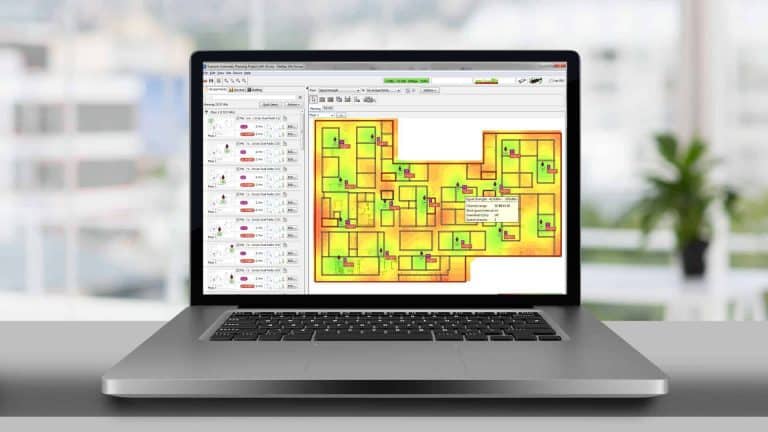
Don’t guess—conduct a site survey to evaluate the building’s layout and identify potential sources of interference before finalizing placement.
Overlooking these factors often causes connectivity gaps and widespread dissatisfaction, so take the time to optimize location and maximize network performance.
Locating Access Points in Corridors
Although it might seem convenient to place access points in corridors, this approach rarely delivers the reliable coverage you need.
Corridors are narrow spaces that often disperse Wi-Fi signals inefficiently, failing to provide strong coverage to adjacent rooms. Instead of focusing coverage where users actually are, corridor-based placement creates imbalance—some areas get strong signals while others suffer from weak or even non-existent connectivity.
Physical barriers like doors and walls reduce the signal’s effectiveness further, and clustering access points too closely in corridors can lead to channel interference.
Before deciding where to install access points, you should always conduct a detailed site survey. This process reveals the real-world signal behavior and user distribution, helping you identify ideal access point locations for dependable, consistent coverage throughout your building.
Ignoring the Capabilities of Client Devices
Many network designs falter because they overlook the capabilities of client devices, leading to preventable performance issues. If you ignore the mix of devices connecting to your Wi-Fi, you risk throttling network performance for everyone.
Older client devices often lack support for the latest Wi-Fi standards and can considerably slow down data rates when routers enable backward compatibility. It’s vital to identify the types of client devices your users rely on and assess their wireless capabilities early in the planning process.
Devices running high-demand applications, like video conferencing or online gaming, especially need robust compatibility and bandwidth support. Regularly updating client devices also helps guarantee you’re not leaving available network upgrades untapped.
Ultimately, aligning your design with device capabilities optimizes efficiency and user satisfaction.
Overlooking High-Density Areas
While considering the capabilities of your client devices lays the groundwork for strong Wi-Fi performance, it’s just as important to pay close attention to high-density areas.
Places like open offices or event spaces often pack in dozens or even hundreds of users, all depending on seamless connectivity. If you overlook these high-density areas, you risk overloading access points, causing dropped connections and frustrating slowdowns.
High-density spaces demand extra attention—overlooking them can overload access points and lead to unreliable, sluggish Wi-Fi for everyone.
Each access point has a device limit, and exceeding it quickly degrades service. Analyze user density carefully to determine the right number and placement of access points, ensuring traffic loads are balanced and signal interference is minimized.
Always conduct site surveys in high-density locations to spot obstacles or dead zones, and leverage Quality of Service (QoS) features to prioritize critical applications.
Frequently Asked Questions
What Factors Should Be Considered When Designing a WLAN?
Imagine streaming everywhere—when designing a WLAN, you’ll assess your physical environment, user density, device demands, and security needs. Don’t forget future growth and regular monitoring, so your network stays strong and adapts as needs change.
What Are the Three Most Common Wi-Fi Problems?
You often face three main Wi-Fi problems: poor coverage from badly placed access points, congestion when too many devices connect at once, and interference from physical barriers or other networks, which all impact performance and reliability.
Which of the Following Are Wireless Configuration Pitfalls to Avoid?
Think of configuring wireless like tuning an orchestra—if you skip key steps, harmony turns to chaos. Don’t ignore site surveys, overload access points, or neglect firmware updates, or you’ll invite interference, bottlenecks, and security breaches.
Which of the Following Is a Key Consideration When Designing a Wireless Network?
When designing a wireless network, you need to assess your physical environment carefully. Analyze barriers, user density, and device types. If you don’t, you’ll risk coverage gaps, congestion, and poor performance for anyone connecting to your network.
Conclusion
When you’re designing a Wi-Fi network, it’s tempting to think more access points automatically solve performance issues. In reality, placement matters far more than quantity. If you avoid mounting mistakes, keep access points out of hidden corners, and factor in both client devices and user density, you’ll maximize reliability. Regular site surveys don’t just confirm your theory—they reveal real-world issues you’d otherwise miss. So, remember: thoughtful design always beats simply adding more hardware.




 English
  Chinese